Skip to content
Pricing
Get started free
HomeProductTrends

Get your name into the article before AI reads it.

Trends is an early warning for the pages AI assistants will cite next: the article being written this week at a publisher your answers already trust, the thread people are asking in, the date that is coming. Each comes with the day it closes and the step that puts your name in it.

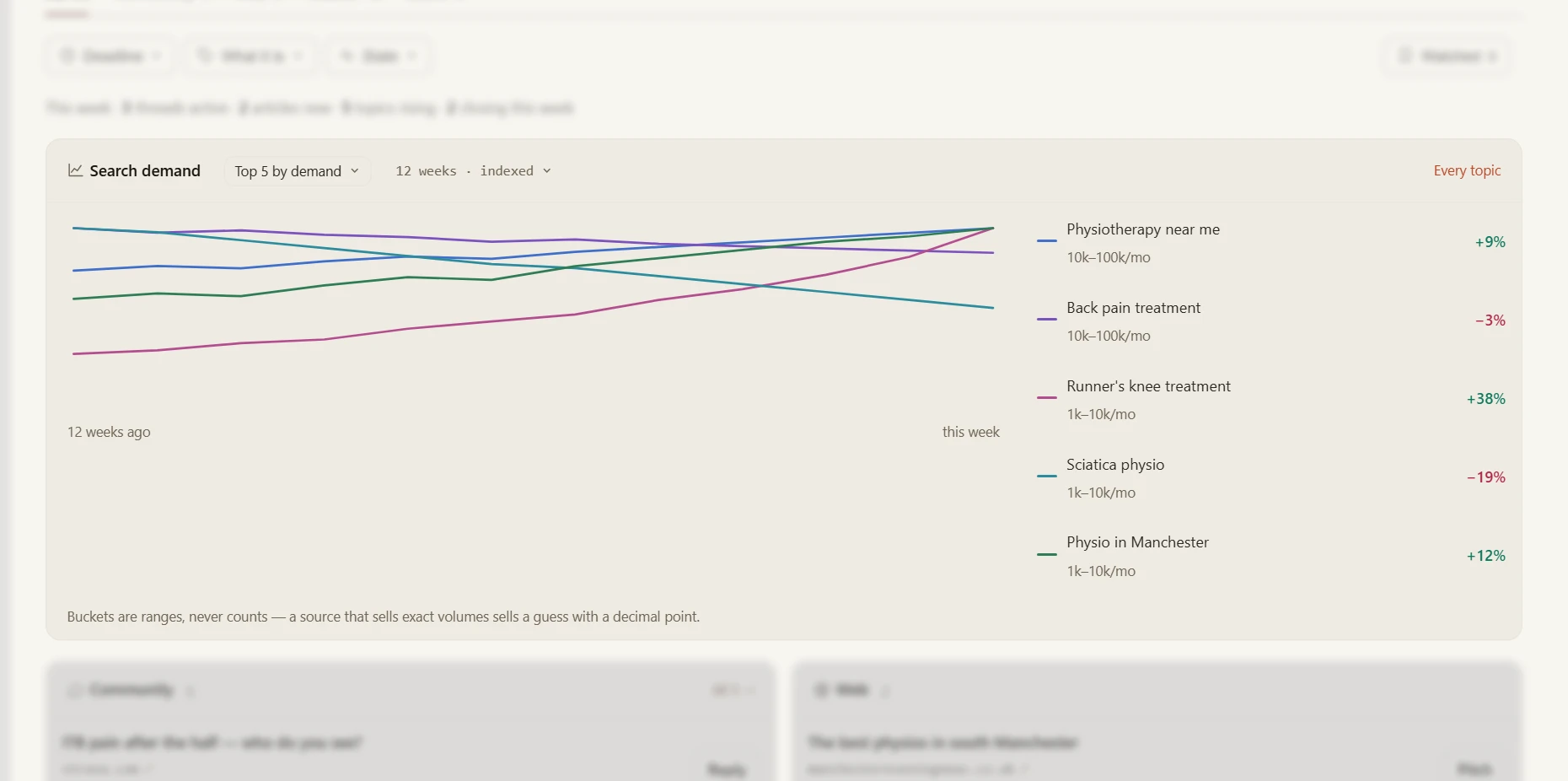
The Trends screen: the Search demand card in focus, five topics over twelve weeks, each a range such as 10k to 100k a month with its change, over the Community and Web boards out of focus.
Search demand for your topics as ranges, never made-up counts. Below it: the threads, articles and dates worth acting on.

Know what’s coming before the engines read it

The pages AI assistants cite for your category keep changing: a publisher refreshes its list, a thread takes off, a date arrives. Trends watches the sources your own answers already cite and tells you when one is moving, while there is still time to be in it. It follows four kinds of signal: articles at those publishers, threads in the communities people ask in, what your market searches for, and dates you set.

The Search demand card on the example workspace: Physiotherapy near me 10k to 100k a month up 9%, Runner's knee treatment 1k to 10k up 38%, Sciatica physio down 19%, over the Community and Web boards.
Example dataThe example workspace: 22 signals this week, two closing within days, five search topics rising. Search demand is a range, never a count.

Data sources shows which feeds are connected and when each was last read. A community Trends cannot read is named and marked no read access, never silently left out.

Every item says why it matters and when it closes

Each item carries the reason it is on your list in plain numbers — this paper’s last list is cited in 58 answers — and the day it stops being useful: this week, before the next measurement, in two weeks. You read the deadline first and decide in seconds.

What the screen showsYour next stepWhat happensCost
An article being writtenPitchA pitch to the page’s editor, with the evidence attached. You send it.
A thread people are asking inReplyA reply as the brand, disclosed. You post it.
A question people are askingTrackAdded to the questions you measure, from the next measurement1 cr each
A topic gaining search demandTrack or BriefMeasured from the next measurement, or a brief for a new page1–2 cr to track
A date coming upBriefA brief with the date and the lead time attached

An item with nothing useful to do about it shows no button, rather than a button that goes nowhere.

From a heads-up to a page that names you

A pitch or a brief opens with the evidence attached: how often the publisher is cited, in how many answers, which competitors its last list named. It lands on your to-do list with the check that closes it, and a person sends it. The next measurement reads whether the new article names you.

The reason travels with it

The note on each item — cited 58 times, get in before the next measurement — goes with it onto your to-do list. Whoever picks it up knows why.

Nothing sends itself

Pitches and replies are drafted for you and sent by a person. A thread Trends cannot read is marked as such, never counted as silence.

You only pay to measure

Tracking a question costs one credit, because it is then measured every time. Pitch, Reply and Brief cost nothing.

What it does not do

Trends watches the sources your answers already cite. Here is what it doesn’t do.

It does notWhat it does instead
Read every forum and social networkReads the communities it can reach, the publishers your answers cite, a search-demand estimate and a calendar you supply; a source with no way in is named and marked no read access
Post or pitch on its ownOpens the reply or the pitch with the evidence attached; a person sends it and marks it sent
Estimate how often a question is asked of an assistantWhere search demand is shown it is a range with its source and date, labelled est., and it is search volume
Predict what an engine will citeRecords which publishers were cited, how often, and whether the next measurement cited the new page

Fair questions

Which sources does Trends read?
Four: a news watchlist over the publishers your own answers cite, a community reader for the threads it can reach, a search-demand estimate that reports ranges rather than counts, and a calendar you supply. Data sources shows which are connected and when each last read.
What does it cost?
Watching costs nothing. Track adds a question or topic to what you measure at one to two credits each, because it is measured every time from then on. Pitch, Reply and Brief open a draft and cost nothing.
Does a pitch get us cited?
Nobody can promise that. Trends puts the pitch in front of the right editor before the list is written, with the evidence attached, and the next measurement records whether the new page names you.
Where does a Trends item go?
Onto Actions, your to-do list, with the reason it was raised and the check that closes it. A reply or a pitch is marked sent by a person; whether the next measurement cites the page is what closes it.
Keep going

Find out what’s being written about your category this week.

Measure your brand once, and Trends starts watching the publishers your answers cite.