Free tools · Schema generator
Turn your page facts into JSON-LD.
The schema generator builds JSON-LD for a product, an FAQ, your organization or an article. Paste the result into the page’s <head>; warnings flag anything to confirm.
Valid against schema.org · ready to paste into <head> · warnings travel with the output.
Filled from kestreloutdoor.com/rain-jackets/summit-shell
Filled from the questions on the Summit Shell page
Filled from kestreloutdoor.com
Filled from clauseminds.com/guides/contract-obligations
Paste this into <head>
Four types, one graph
Connect the blocks into one graph.
Product, FAQ, Organization and Article each stand alone, and they read best as one graph: the page names its product, the product names its brand and its offer, the guide names its publisher.
Add, match, check
Put the markup on the page, then check the live page.
Generated JSON-LD does its job once the block sits on the published page, agrees with what visitors read and passes a check. Here is a product page with its Product block in place.
kestreloutdoor.com/rain-jackets/summit-shell · page source
1<!doctype html>2<html lang="en">3<head>4 <title>Summit Shell Rain Jacket | Kestrel Outdoor</title>5 <script type="application/ld+json">Paste here6 { "@type": "Product", "name": "Summit Shell Rain Jacket",7 "offers": { "price": "189.00", "availability": "InStock" } }8 </script>9</head>10<body>11 <h1>Summit Shell Rain Jacket</h1>12 <p class="price">$189.00 · In stock</p>Same price as the markup13 <h2>How much does the Summit Shell weigh?</h2>Every FAQ answer visible14 <p>280 g in a men’s medium.</p>15</body>Paste into <head>
Add the block to the page’s <head>, or to the template that builds every product page. One script block per type, or one @graph holding them all.
Match the page
The price, availability and every FAQ answer in the markup must also be visible on the page itself. When the page changes, update the markup with the page.
Check the live page
Run the website checker on the published URL. The structured data checks confirm the JSON-LD parses, declares a main entity and carries the offer. Google’s Rich Results Test then shows which rich results the page qualifies for.
Check the live page
Warnings that travel with the output
Three lines held back, each with its reason.
The generator writes a rating only from real review numbers you supply, a price only after you confirm the price matches the page, and profiles only when they are real URLs. Each warning names the field to fix before you publish.
{ "@type": "Product", "name": "Summit Shell Rain Jacket", "brand": { "@type": "Brand", "name": "Kestrel Outdoor" }, "aggregateRating": { "ratingValue": "4.8", "reviewCount": "127" },Refused: no real review numbers were supplied "price": "149.00",Held: the page says $189.00. Confirm the price matches the page "sameAs": [ "Kestrel Outdoor on Facebook" ]Dropped: not a URL}Publish the markup, then check the page.
Markup helps only on a page engines can reach and read. Check both, then keep the facts in step with your catalogue.
-
Check the markup is read
Run the website checker on the live page: the JSON-LD should parse, declare the main entity and carry the offer.
Check a page free -
Check crawlers can reach the page
Markup on a page no crawler can fetch does nothing.
Check AI crawler access -
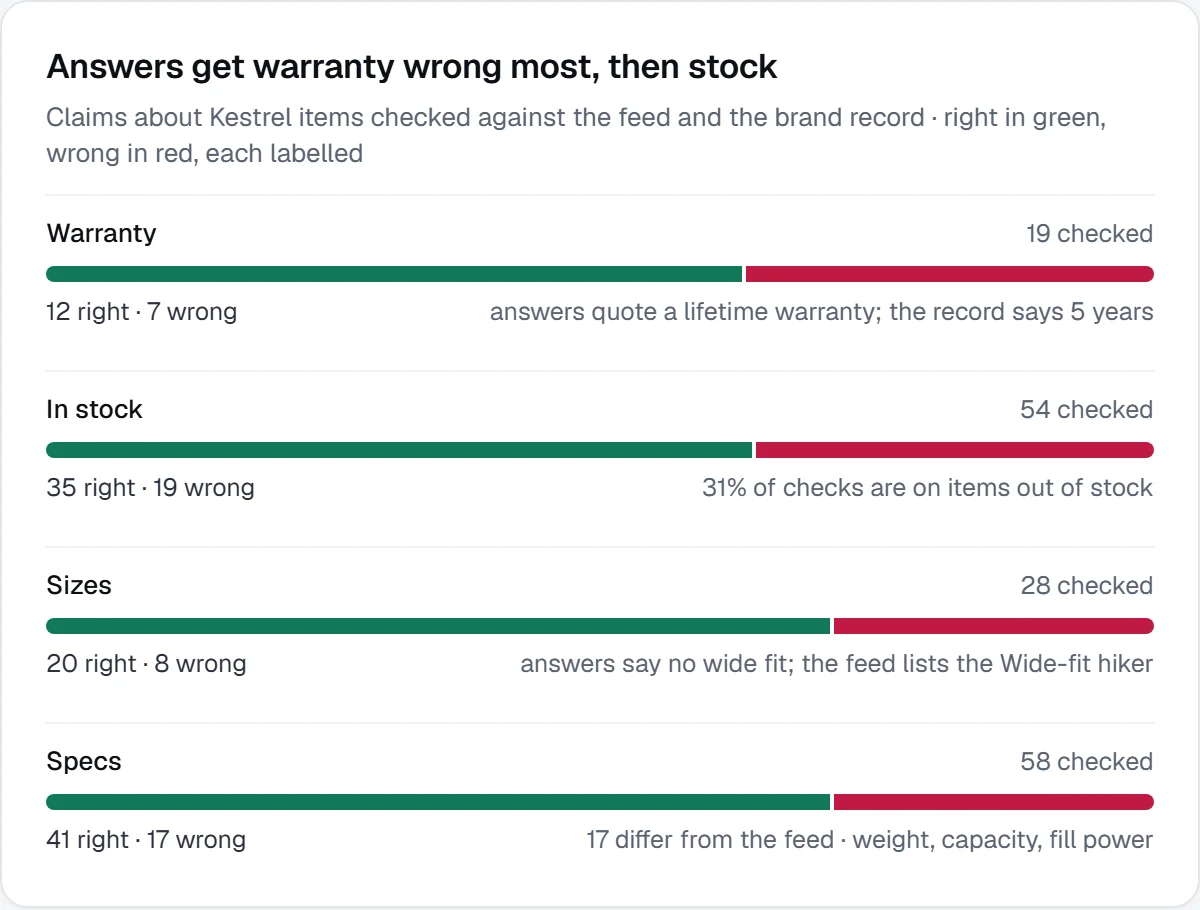
Keep the facts matching the feed
The platform checks what answers say about each product against your product feed.
Explore products & shopping -
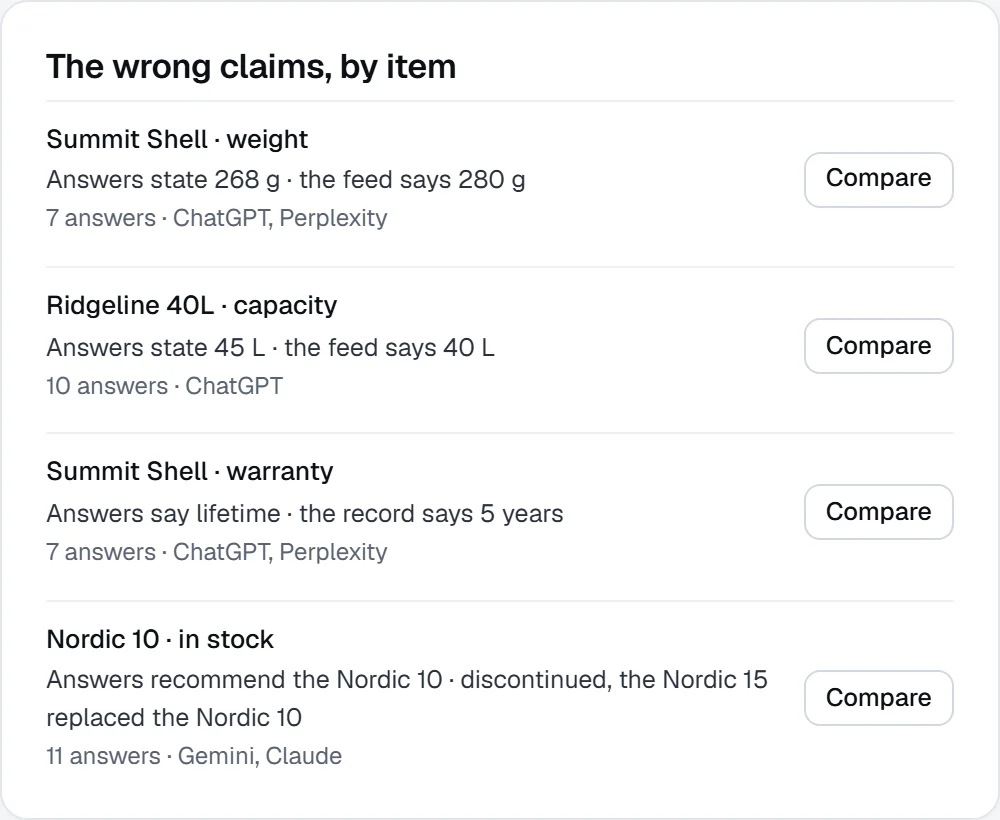
Fix what answers get wrong
Wrong weights, prices and stock, item by item, each with the page to fix.
Find the wrong claims by item
More free tools.
All free toolsQuestions, answered.
Something else on your mind? Contact us.
Only when you supply real review numbers. A rating without real reviews breaks Google’s structured-data rules, and the generator leaves the rating out.
Into the page’s <head>, or into the template that builds the page. Every FAQ answer in your markup must also be visible to a human on the page.
Yes. Edit any field and the JSON-LD rebuilds as you type. Clear a field to leave the field out, and copy the result once the warnings are dealt with.
Markup in place? Check the page.
Run the website checker on the published page to confirm the JSON-LD parses, then make sure AI crawlers can reach the page at all.