The GEO templates pack · free
The files AI engines read, ready to paste.
robots.txt, llms.txt and the structured-data blocks, written out with brackets to fill.
A copy is on its way to . PDF · 870 KB.
PDF · 9 pages · 8 chapters. Most of it is on this page; the whole pack comes as a PDF.
What’s inside
4 of 8 on this page. The rest, and the whole pack as one file, by email.
- 01robots.txtRules for 25 AI crawlers, with answer agents kept apart from training crawlers.
- 02llms.txtThe index file, and a plain note on what it does and does not do.
- 03Organization and sameAsThe block that tells your brand apart from a similar name.
- 04FAQPageQuestions and answers, marked up to match the page.
- 05ProductThe product entity, with the fields engines quote.In the PDF
- 06ArticleGuides and articles, with dates that stay honest.In the PDF
- 07Page skeletonA page top to bottom, in the order an engine reads it.In the PDF
- 08Fact sheetOne approved set of facts that every page repeats.In the PDF
Crawler access
Two decisions, not one. Search and answer agents fetch pages to build the answer a user is reading right now and usually cite the source — blocking them removes you from AI answers, which is a visibility decision. Bulk training crawlers collect corpora for the next model — declining them is a licensing decision, and either answer is defensible. Conflating the two is the expensive mistake.
Search and answer agents
Allow: /for most vendors
- They fetch
- The page behind the answer a person is reading now
- Blocking means
- You disappear from AI answers
Bulk training crawlers
Allow: /orDisallow: /
- They collect
- Text for training the next model
- Blocking means
- Less chance of entering its memory
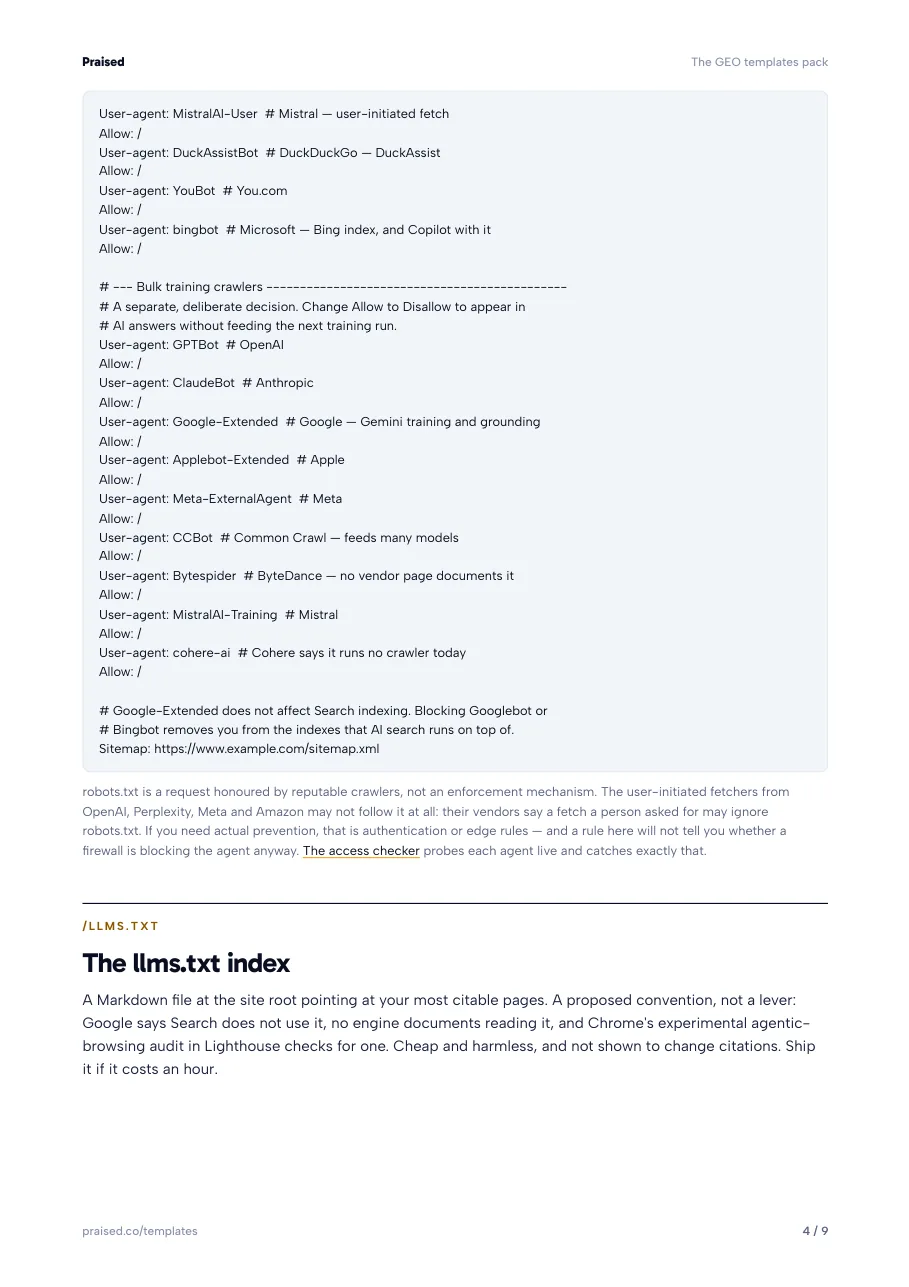
# --- Search and answer agents -------------------------------------------
# These build the answer a person is reading, and usually cite you.
# Blocking them removes you from AI answers.
User-agent: OAI-SearchBot        # OpenAI — ChatGPT search index
Allow: /
User-agent: ChatGPT-User         # OpenAI — user-initiated fetch
Allow: /
User-agent: Claude-SearchBot     # Anthropic — Claude search
Allow: /
User-agent: Claude-User          # Anthropic — user-initiated fetch
Allow: /
User-agent: PerplexityBot        # Perplexity — index
Allow: /
User-agent: Perplexity-User      # Perplexity — user-initiated fetch
Allow: /
User-agent: Applebot             # Apple — Spotlight, Siri, Safari; may also train Apple's models
Allow: /
User-agent: Meta-WebIndexer      # Meta — Meta AI search
Allow: /
User-agent: Meta-ExternalFetcher # Meta — user-initiated fetch
Allow: /
User-agent: Amzn-SearchBot       # Amazon — Alexa and Amazon search
Allow: /
User-agent: Amzn-User            # Amazon — user-initiated fetch
Allow: /
User-agent: MistralAI-Index      # Mistral — search index
Allow: /
User-agent: MistralAI-User       # Mistral — user-initiated fetch
Allow: /
User-agent: DuckAssistBot        # DuckDuckGo — DuckAssist
Allow: /
User-agent: YouBot               # You.com
Allow: /
User-agent: bingbot              # Microsoft — Bing index, and Copilot with it
Allow: /

# --- Bulk training crawlers ---------------------------------------------
# A separate, deliberate decision. Change Allow to Disallow to appear in
# AI answers without feeding the next training run.
User-agent: GPTBot               # OpenAI
Allow: /
User-agent: ClaudeBot            # Anthropic
Allow: /
User-agent: Google-Extended      # Google — Gemini training and grounding
Allow: /
User-agent: Applebot-Extended    # Apple
Allow: /
User-agent: Meta-ExternalAgent   # Meta
Allow: /
User-agent: CCBot                # Common Crawl — feeds many models
Allow: /
User-agent: Bytespider           # ByteDance — no vendor page documents it
Allow: /
User-agent: MistralAI-Training   # Mistral
Allow: /
User-agent: cohere-ai            # Cohere says it runs no crawler today
Allow: /

# Google-Extended does not affect Search indexing. Blocking Googlebot or
# Bingbot removes you from the indexes that AI search runs on top of.
Sitemap: https://www.example.com/sitemap.xml
robots.txt is a request honoured by reputable crawlers, not an enforcement mechanism. The user-initiated fetchers from OpenAI, Perplexity, Meta and Amazon may not follow it at all: their vendors say a fetch a person asked for may ignore robots.txt. If you need actual prevention, that is authentication or edge rules — and a rule here will not tell you whether a firewall is blocking the agent anyway. The access checker probes each agent live and catches exactly that.
The llms.txt index
A Markdown file at the site root pointing at your most citable pages. A proposed convention, not a lever: Google says Search does not use it, no engine documents reading it, and Chrome's experimental agentic-browsing audit in Lighthouse checks for one. Cheap and harmless, and not shown to change citations. Ship it if it costs an hour.
- robots.txtwho may read
- sitemap.xmlevery URL
- llms.txtthe pages to read first
## Start hereWhat you do, and pricing## ProductsEach hub and its specs## ReferenceGlossary, Wikipedia, Wikidata## CompanyAbout and contactA proposed convention, not a lever. No engine documents reading it. Ship it if it costs an hour, generated from the sitemap so it never goes stale.
# [Company]

> [One sentence: what the company does, for whom.]

## Start here
- [What [Company] does](https://www.example.com/): [Canonical one-liner.]
- [Pricing](https://www.example.com/pricing): [What it costs and what's included.]

## Products
- [[Product] hub](https://www.example.com/products/[product]): [Canonical definition.]
- [[Product] specifications](https://www.example.com/products/[product]/specs)

## Reference
- [Glossary](https://www.example.com/glossary)
- [[Company] on Wikipedia](https://en.wikipedia.org/wiki/[Company])
- [[Company] on Wikidata](https://www.wikidata.org/wiki/[Q-id])

## Company
- [About](https://www.example.com/about)
- [Contact](https://www.example.com/contact)
Generate one automatically from your sitemap with the llms.txt generator rather than hand-keeping this file — a stale index is worse than none.
Grounding the brand entity
This is the block most sites are missing, and it is the one that lets an engine
tell your brand apart from a similarly named one. sameAs is the literal machine
instruction "these all refer to the same thing".
Organization
[Company]
"sameAs": [ … ]
“These all refer to the same thing.”
A similarly named company is not in the list, and the canonical description tells them apart.
<script type="application/ld+json">
{
  "@context": "https://schema.org",
  "@type": "Organization",
  "@id": "https://www.example.com/#org",
  "name": "[Company]",
  "alternateName": ["[Short name]", "[Legacy name before the rebrand]"],
  "url": "https://www.example.com/",
  "logo": "https://www.example.com/[real-logo].png",
  "description": "[Canonical one-sentence definition, reused word for word everywhere]",
  "foundingDate": "[YYYY]",
  "sameAs": [
    "https://en.wikipedia.org/wiki/[Company]",
    "https://www.wikidata.org/wiki/[Q-id]",
    "https://www.linkedin.com/company/[handle]",
    "https://github.com/[handle]"
  ]
}
</script>Questions and answers
Mirror the visible block exactly. The visible questions are what get extracted; the markup only makes them unambiguous. Marking up answers that do not appear on the page is the one way this block can hurt you.
On the page
FAQPage markup
"name": "[Real buyer question]",
"text": "[One-sentence direct answer…]"

"name": "[Second question]",
"text": "[Its answer…]"

"name": "[A question not on the page]"
Marking up an answer the page does not show is the one way this block hurts you.
<script type="application/ld+json">
{
  "@context": "https://schema.org",
  "@type": "FAQPage",
  "mainEntity": [
    {
      "@type": "Question",
      "name": "[Real buyer question, word for word from the page]",
      "acceptedAnswer": {
        "@type": "Answer",
        "text": "[One-sentence direct answer, then the supporting detail]"
      }
    }
  ]
}
</script>
In the PDF
The page skeleton and the fact sheet are in the pack.
With the Product and Article blocks. The four templates above make a site readable. These four shape the page an engine quotes, and keep every page stating the same facts.
- ProductThe product entity, with the fields engines quote.
- ArticleGuides and articles, with dates that stay honest.
- Page skeletonA page top to bottom, in the order an engine reads it.
- Fact sheetOne approved set of facts that every page repeats.
A copy is on its way to . PDF · 870 KB.
- Build the page, not only the markup. The skeleton lays a page out top to bottom, in the order an engine reads it.
- Know when a crawler changes. Agents get renamed, added and retired. We email you when the crawler list moves.
- Hand one file to a developer. All eight templates in one PDF, every bracket marked.
One email with your copy, then a note only when the pack changes. One-click unsubscribe on every email. How we use your address.